A Network in Rust, Part 3
01 Jun 2024

We are in the home-stretch now. Let’s show a few more details and then we’ll run the whole thing and show that it works.
This post is part 3 of a series. We are learning networking by building a network.
- Part 1 - covered networking basics and implemented MAC addressing
- Part 2 - implemented primitives like IP, ARP and an Interface
More Abstractions
In part 2, we created an interface and previewed how we can make “a box” at the end of the post. A box is just slang for a server, a node or a computer. There are many ways we could represent a box, but one way would be for it to own the things that it owns in the real world. Since we will not model an entire operating system here, this is just an approximation.
The Server
A box (or server) owns its hostname, has an interface and an ARP table.
pub struct Server {
  pub hostname: String,
  pub interface: Interface, // for now, one interface
  routes: Vec<Route>,       // routing table, not implemented
  pub arp_table: arp_cache::ArpCache,
}
It also owns its routing table as routes. But the routes part of a server is not implemented here because we never made a router. There is also a major gap in how an ICMP reply would be handled. In the real world, there would be a network stack listening that would generate a response. This is not implemented.
The Switch
pub struct Switch {
  ports: HashMap<u8, port::Port>,
  link_lights: HashMap<u8, bool>,
  cam_table: HashMap<MacAddress, u8>, // MAC to port number
}
A Network in Rust, Part 2
17 May 2024
This post is part 2 of a series. We are learning networking by building it.
- Part 1 - covered networking basics and implemented MAC addressing
- Part 3 - finishes the abstractions and shows the whole thing working
More Primitives
Let’s model an IP address next. Luckily, Rust has one already as std::net::Ipv4Addr but it does not include all the functionality we need. It is just the data represenation of an IP address. We need what is routing.
I’m certain you’ve seen an IP address before. The interesting thing about an IP address is that it usually goes together with a subnet mask and a gateway address. These three things together tells the IP stack whether an address is local or not. If it’s not local, it sends it to a router. If it is local, it continues to send the message, usually to the local network.
In our simple example, we won’t implement a router but we still want to explore this network concept so we’ll implement it as a function even if it will inevitablly return true. Figuring out if a network address is local or not is not something Rust can do with stdlib. But the logic is pretty simple and can be expressed in 4 lines of Rust.
What we need to do to figure out if our IP message is local is look at the source IP, destination IP and subnet mask:
- Take the source IP address and figure out the network address. The network address is a bitmask of the subnet mask and the IP address. This is why it’s called a subnet mask. You just AND the bits up. I explain this later.
- Take the destination IP address and do the same thing.
- Now you have two network addresses. Source network address and destiation network address.
- Compare the two networks. If they are the same, send it locally (ie: Ethernet). If they aren’t, send the IP message to the router.
The Mask in Subnet Mask
Let’s say we have this IP address and subnet mask.
IP Address:  192.168.0.1
Subnet Mask: 255.255.255.0
We can explode this out into bits because each number is an 8-bit number in IP version 4.
IP:   11000000.10101000.00000000.00000001
Mask: 11111111.11111111.11111111.00000000
If we logically AND these together (only print a 1 if both are 1) then we get this:
11000000.10101000.00000000.00000000
Which if you turn into decimal again is 192.168.0.0. This tells us what the network address is. In other words, if we do the same for an IP address which is “next to” 192.168.0.1 like 192.168.0.42 then the network address is the same. This is what the mask does. It’s a bit mask by an bit-wise AND operation.
IP Address:  192.168.0.1
Subnet Mask: 255.255.255.0
Network:     192.168.0.0

IP Address:  192.168.0.42
Subnet Mask: 255.255.255.0
Network:     192.168.0.0
So, you can see that the Network address for ` 192.168.0.1 and 192.168.0.42 above are both the same 192.168.0.0`. That means, don’t route it. It’s on the same network, just send it locally (make an Ethernet message). So, let’s create a function to do all this.
use std::net::Ipv4Addr;

pub fn same_subnet(src: Ipv4Addr, dest: Ipv4Addr, subnet: String) -> bool {
    let subnet_parsed: Ipv4Addr = subnet.parse().unwrap();

    let src_network = ipv4_to_u32(src.octets()) & ipv4_to_u32(subnet_parsed.octets());
    let dest_network = ipv4_to_u32(dest.octets()) & ipv4_to_u32(subnet_parsed.octets());

    src_network == dest_network
}

// to_bits is nightly experimental on Ipv4Addr so we have to do it ourselves
fn ipv4_to_u32(octets: [u8; 4]) -> u32 {
    ((octets[0] as u32) << 24)
        | ((octets[1] as u32) << 16)
        | ((octets[2] as u32) << 8)
        | (octets[3] as u32)
}
A Network in Rust, Part 1
05 May 2024
Let’s take the magic out of networking, shall we?
First things first, let’s establish some ground rules:
- Our aim is to provide an abstraction level akin to that experienced by a Linux server or networking device user, not delving into the intricacies of network engineering.
- We’ll avoid nitty-gritty details of bits, electrons, and cables. After all, when people say they don’t grasp networking, they’re usually not referring to the physics behind it.
- Our model won’t operate within an event loop. While scripting or CLI tools are fantastic, they’re inherently limited by their sequential nature. Real-world networking operates asynchronously, akin to a bustling city where events occur in parallel. To replicate this, we would need to veer into text-mode game territory, and I don’t want to do this. We can learn about networking without making a long-running program but some things will need to be faked.
Now that we’ve set some boundaries, let’s name some exciting topics ahead. We will explore bit-math, frames, packets, understand different abstraction layers, make a binary file that can actually be read by Wireshark and create a working local area network (LAN) using real specifications.
This is a series of posts exploring networking by building things:
- Part 2 - implements primitives like IP, ARP and an Interface
- Part 3 - finishes the abstractions and shows the whole thing working
For more in-depth background, here is a nice video series but I encourage you to replicate my work and build a network yourself in Rust or some other language. You’ll learn more by doing.
Approximately How Networking Works
Networking works in abstraction layers from the point of view of the OSI model. From the bottom up, it goes (1) Physical, (2) Data Link and then (3) Network layer. It continues to higher abstraction layers but our simulation and this blog post series will stop at layer 3.
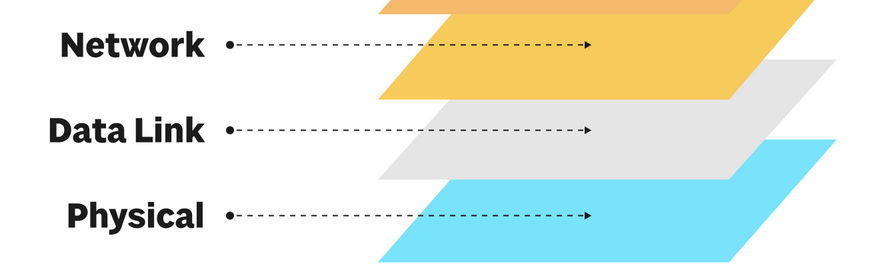
Imagine a server named box1 pings box2.
user@box1 $ ping box2
The ICMP program ping is way up at layer 7 (not pictured below) and sends information down the left side of the picture below ICMP client -> IP -> Ethernet -> Switch Port 1. Eventually it turns into bits, electricity that flows across the switch through cables (not pictured) and then hits box2’s stack where it flows back up right side. This flow up the right side of the picture is shown below as Switch Port 4 -> Ethernet -> IP -> ICMP client. (The ICMP responder would really a part of the network stack on box2). So notice that the flow down the left side and the flow up the right side are opposite and reversed.
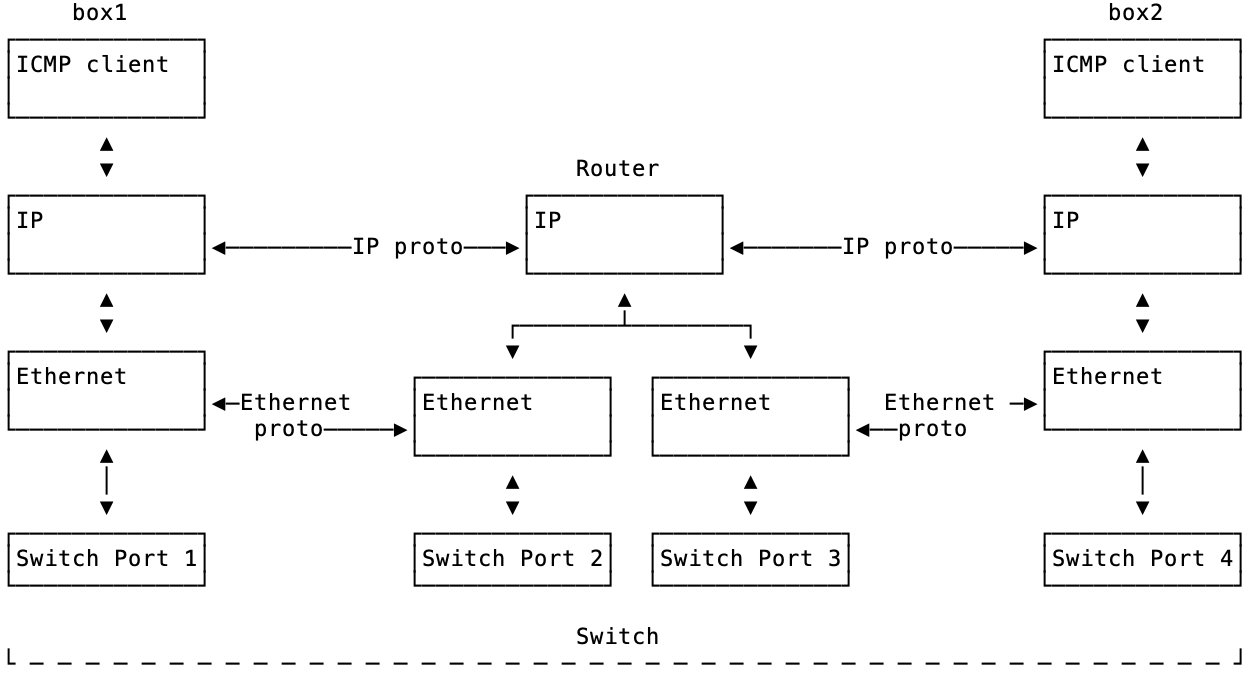
We will talk about all the details of all of this. But here are key takeaways at this point:
- Details are hidden by the abstraction layers.
- The layers are different. The physical layer could be copper wires, wifi, pigeons or glass. The other layers don’t know or care. Ping works the same over wifi or wires.
- Each layer has its own concerns (non-leaky abstraction).
Microframeworks Are Too Small
20 Dec 2023
I want to talk about what microframeworks don’t solve but also why there has been and continue to be so many of them. First, I guess we should identify some terms. Identifying if a web framework is a microframework is debatable but I would call it a microframeworks if:
- The author calls it a microframework
- It has a small hello world example that looks like Sinatra in the README or the homepage
- It doesn’t pre-solve a common problem for you
So, Flask / Express / Sinatra are microframeworks as opposed to their sister projects Django / Next.js or others / Rails. If the language ecosystem offers a pair like Django vs Flask then comparatively, Flask is the microframework by comparison and not just because wikipedia also classifies it this way. It’s because it’s smaller than Django. This is not obvious if a language does not have a bigger framework.
The “pre-solve a common problem for you” is the big one. To make this more concrete, I will be using the use case of adding a database to your project as an inflection point. Larger frameworks usually have some kind of story around adding a database and the microframeworks do not.
It Started with Sinatra
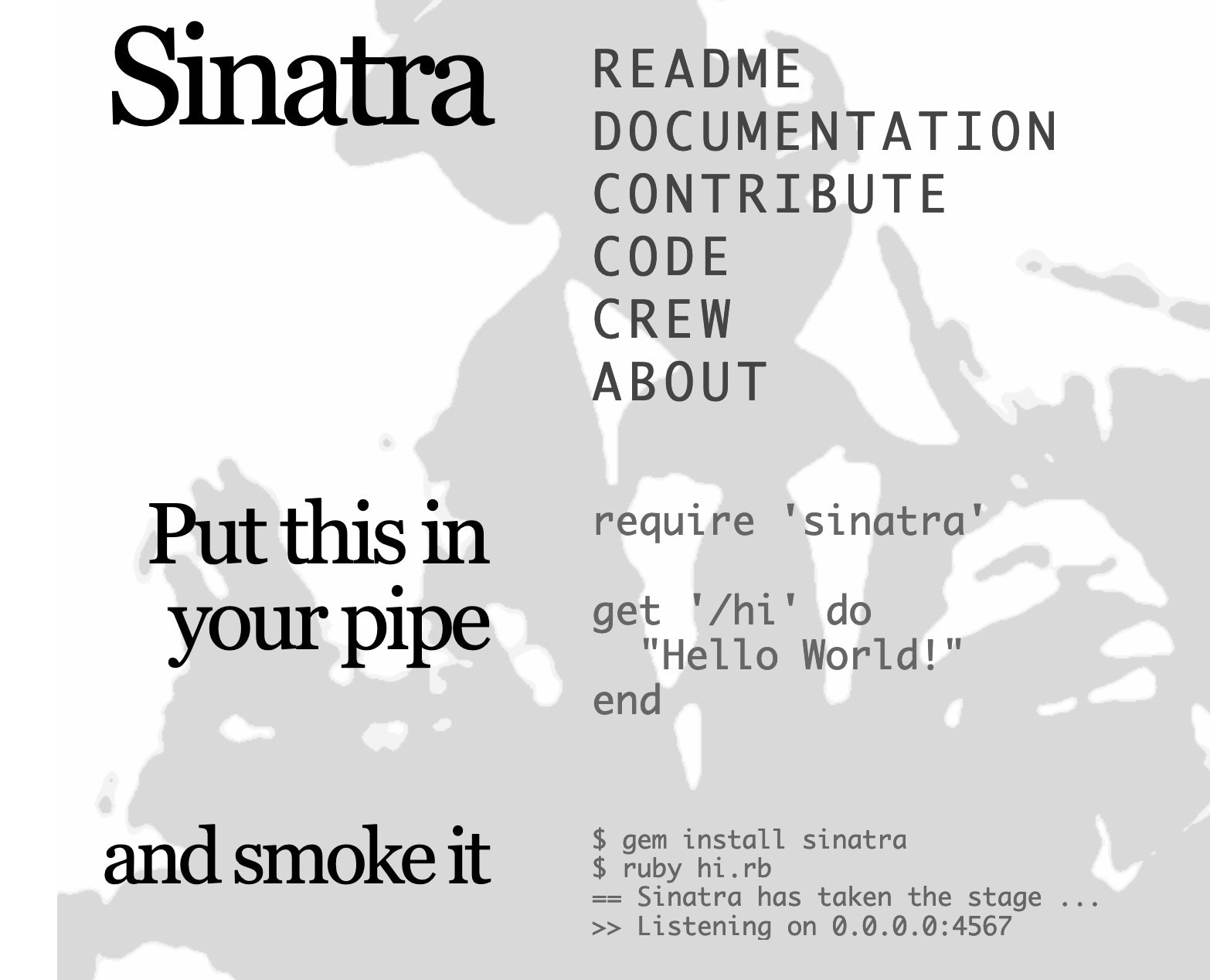
There are many microframeworks in every language but it started with Sinatra. Sinatra had this very cute and small README snippet on their home page. “Put this in your pipe and smoke it” was the original tagline. The picture above is from The Wayback Machine. It was compelling and provocative at the time. You wire up a route and you get some plain text back. The whole idea fits in a code snippet and this was hard to ignore.
require 'sinatra'

get '/' do
  'Hello world!'
end
The trade-offs of Sinatra are not obvious in the above Hello World. To me, the simplicity trade-off is inticing to juniors when they don’t know what the trade-off is. The API surface is small which is easier to learn. But confusing things start to happen after that. If you start a Sinatra
project, you will realize that when you change your code, you have to ctrl-c to stop the dev server and start your app again with ruby myapp.rb. Every code change, switch terminal, ctrl-c, up-arrow, enter. That was just changing code, manual
testing. Yes, there was a plugin to do dev reloading but so many other questions and concerns would appear after this most basic flow. It doesn’t come with dev reloading and common use cases continue from there:
Where do I put passwords?
How can I add a database?
How do I build or deploy this thing?
So, as the project grew or if you simply kept
working with it you would have to solve, research or enhance Sinatra yourself. Many times, myself and others
would copy whole files out of Rails default projects. Like, we’d generate a Rails project off to the side and steal .rb files from it. Or, we’d end up stealing ideas from Rails. Ideas like development server reloading, where to put configs, test fixtures or the concept of dev/test/prod.
But I think these DX nit-picks are not where the test is. I think adding a database to a microframework is the inflection point where the lack of features makes things tedious and confusing.
The Database is the Inflection Point
I think configuring a database stresses the framework and most microframeworks fail here. This isn’t quite The Database Ruins All Good Ideas, it’s more like, The Database Makes the Framework Creak.
Some teams running Flask might say “we have a database in Flask already, it’s easy” but what they really have is a bunch of hidden context. Take this example of how some work with Flask:
- There’s a production database which a Flask app connects to. This is the only database in the world for this application. There is no dev database, even on a laptop.
- The SQL to create this empty database was copied to something like Dropbox, email or a file share. Or maybe it never was. “Why would you need an empty database?”
- The database rarely changes but not by intent. When a change needs to happen, stress and confusion levels are high. It might even be deemed impossible.
- The password for the database connection is in git and the repo is set to private. This password is never rotated when team members leave.
- When you boot Flask to do development, Flask connects to the production database because that’s where the data is (“what else could we do?”).
In some cases, the fact that this setup works at all is sometimes related to the circumstance that the application is a read-only visualization or dashboard. If the application had become read-write, this entire idea would fall apart. Or, maybe there’s a “database person” that essentially is a mutex for the team. Or, maybe the app is so small in scope that this is fine.
So far, this hasn’t been my experience. My experience has been to take ideas as needed from full frameworks and bring them into Flask. These concepts are not obvious in Flask because Flask do not have these concepts in them. Take dev/test/prod. In order to add dev/test/prod, we need to:
- Get the passwords out of git and introduce the dotenv library
- Add some configuration files, maybe with Dynaconf
- Add database migrations and seeding
- Have every dev have a local database
- Have some example data or factories or something
If we get this far, a pull request could have code and schema changes proposed. Without it, we’re unlikely to mess around with the database structure.
You might be quick to blame the team. I’m quick to blame the tool but blame isn’t interesting here. I think Flask influences thinking and trades-off too far in the direction of simplicity. There is no dev/test/prod in Flask so I have to invent it by composing libraries
together on top of Flask. Actually getting this to work with tests and conftest.py is non-trivial. I’m not saying there is no trade-off either. There is absolutely a trade-off. Adding a dev database might confuse juniors. We might have to introduce Docker or try to solve development environments. I might have just invented my own flask-unchained by selecting libraries.
For very simple applications, this simple setup might work fine. I don’t think it works for long. I think applications usually grow in complexity and features. I think it is common to have Flask fall apart in your hands I think teams in this situation have only been exposed to Flask. My experience in these cases has been to introduce ideas from other frameworks to Flask-only teams. My experience is that even small apps outgrow Flask because most apps have state in the database and the default experience (not just Flask) is awful.
Most of the Work is Explanation
For dev/test/prod and Flask, the change in thinking had to be the following. There isn’t just one database. There are many instances of this database in different environments for different purposes. This is a flawed “shared development server” style of thinking where the only database available is the production one. It’s not A database, it’s THE database.
┌────────────────┐
│ "THE" Database │
│                │
└────────────────┘
         ▲
         │
         │
┌────────────────┐
│ Flask (laptop) │
│                │
└────────────────┘
Instead, thinking of it like as many instances in different contexts or environments this opens up many options.
┌───────────────────┐  ┌───────────────────┐  ┌───────────────────┐
│ A Database (dev)  │  │ A Database (test) │  │ A Database (prod) │
│                   │  │                   │  │                   │
└───────────────────┘  └───────────────────┘  └───────────────────┘
          ▲                      ▲                      ▲
          │                      │                      │
          │                      │                      │
┌──────────────────┐   ┌──────────────────┐   ┌──────────────────┐
│   Flask (dev)    │   │   Flask (test)   │   │   Flask (prod)   │
│                  │   │                  │   │                  │
└──────────────────┘   └──────────────────┘   └──────────────────┘
There are many databases and not just one. There is no shared development server or shared state. There is no shared development anything. Test might be CI but test can also be your laptop. It is the dev -> test -> prod progression.
Thinking of it this way solves problems like:
- how can we rotate passwords or get them out of git?
- how can I change the database structure while it is running?
- how can we scale from 1 developer to 5?
But this is not what Flask comes with in the Hello World example nor does Flask teach you by example what this concept is. In order to get there you need to add plugins, libraries and configuration. Of course, full frameworks cannot solve all your problems (you have to code something). But when you need to diverge from the framework is usually much later in the project’s life and a good framework will be solving common problems for you (better than you could have done). It’s reuse.
Trade Offs
I think a lot of this is inevitable given an assumption of what class of application your application will turn out to be. Even with this viewpoint that I and others have, it was annoying when a greenfield would come along and we didn’t want to include all of Rails but we also knew that we’d regret picking Sinatra later because we’d have to at least handle things like passwords, ENVs, a database connection pool and development quality of life things. The trade-offs were known, which is why a microframework was being considered. But, do we need all of Rails, all the time? It’s annoying to have to have every concern included by default. Maybe we don’t have and won’t have an admin interface. Maybe we will never send email. But then we think through all the missing features and realize that we’d have to copy and steal ideas. This is also what happens in FastAPI to configure the database. Because FastAPI has “no database ideas” in it, you have to copy and paste configuration from documentation. Ideally, I’d want to opt-out of features in a full-framework and have it be configurable. Even with opt-out, the complexity is still there so I understand the draw to a small API surface area.
Flask was inspired by Sinatra. It has the same trade-offs as Sinatra. If you try to enhance Flask to have more concepts in it then you end up with your own framework. Look at flask-unchained. The features that flask-unchained are the features that Flask does not have. It comes with an opinion on databases, it has a structure for APIs etc. The issue with these projects is they are not authored by Flask Unchained. So the trade-off is a flexible plugin system counter open-source maintainance issues. Many Flask plugins are not maintained. The same issue happens in other languages. Full-featured frameworks usually control more of the stack. So, when they do a release, those things that they include or have written are bumped or fixed so they work in the new release. In theory, a plugin system sounds ideal because it has flexibility. What I’m arguing is that CORS, authentication and database state are extremely common and these things should be in the framework.
More than that, copying and pasting configs from FastAPI docs is one-way and subject to bit-rot. Controlling configuration even in a full framework is extremely challenging but usually there can be step-to-step upgrade guides but this only works when you can name the version you are on. If you are copying and pasting configuration and code, what version of FastAPI are you on?
A Tour of Small READMEs
There are many microframeworks in many languages. Most of them have a small hello world README just like Sinatra did.
package main

import (
  "github.com/labstack/echo/v4"
  "github.com/labstack/echo/v4/middleware"
  "net/http"
)

func main() {
  // Echo instance
  e := echo.New()

  // Middleware
  e.Use(middleware.Logger())
  e.Use(middleware.Recover())

  // Routes
  e.GET("/", hello)

  // Start server
  e.Logger.Fatal(e.Start(":1323"))
}

// Handler
func hello(c echo.Context) error {
  return c.String(http.StatusOK, "Hello, World!")
}
require "kemal"

# Matches GET "http://host:port/"
get "/" do
  "Hello World!"
end

# Creates a WebSocket handler.
# Matches "ws://host:port/socket"
ws "/socket" do |socket|
  socket.send "Hello from Kemal!"
end

Kemal.run
const express = require('express')
const app = express()
const port = 3000

app.get('/', (req, res) => {
  res.send('Hello World!')
})

app.listen(port, () => {
  console.log(`Example app listening on port ${port}`)
})
These examples are easily understood which is a pro in the complexity trade off. What is not shown is the other side of the trade off.
There are Few Fully-Featured Frameworks
There are very few fully-featured frameworks and there is usually only one or two in each language.
- Python has Django
- Javascript has Next or Remix or RedwoodJS
- Java has Spring Boot
- PHP has Laravel
- Ruby has Rails
- C# has .NET
- Elixir has Phoenix
But there are very few others. It seems that language communities tend to rally around one or two full frameworks and these frameworks last a long time. The microframeworks might churn a lot more because there is less to throw away or because they are easy to invent? Flask interest turns to FastAPI. Sinatra interest turns to Grape. Express interest turns to Fastify. But Django interest rarely turns into anything except a newer version of Django. Masonite is a rare exception (I have not tried it at scale). It’s much easier to create a hobby microframework project that is small in scope.
I think this is because full frameworks take 7 years to do right and this is assuming a productive or high-level language. The amount of work it takes to make a framework that is documented, tested and feature-rich is huge. Usually it seems to require a sponsored company or extraction out of a working business. Django was extracted out of a newspaper company. Rails was extracted out of a team management company. Next was extracted or built in parallel out of a hosting company. RedwoodJS is from an exited Github founder. I think it is interesting that this is the scale that is required but it also might help us predict what is possible. Can a hobbyist disrupt a full-framework? Can a single person invent a Django or Rails killer?
We can almost skip microframework attention because they will be the first to go. I am not trying to FUD people out of hobby projects. Do it, make your thing. But unless it has some very novel idea in it, then it’s unlikely to stick. We’ve had hundreds of microframeworks already. So if the real reason for invention is “I did it because I could” then this isn’t good enough. We need more “what we need” even if it takes years. This is my main point. Full-featured frameworks are harder to make and harder to learn. But they have ideas in them that you should probably know about. Critically think about the Hello World README example in Flask / Sintra / Express.
Ruby Has Long Known About Poetry
24 Oct 2023
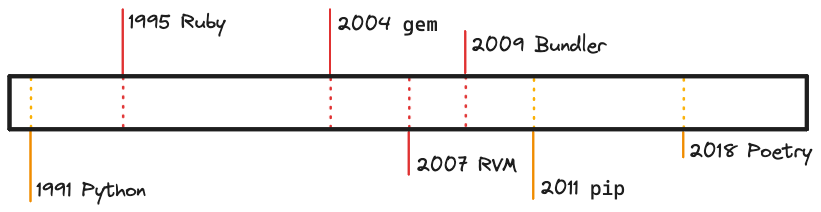
Ruby has known about the Python package manager Poetry for a long time as Bundler. This is not a smug victory lap. Bundler was not always the thing to use. If the sands of time are going to bury Ruby so that the language is deleted from all multiverse timelines, then we might as well listen to its dying words:
“The Poetry transition is the Bundler transition, we already went through this. Ack.” 💀
Bundler is the de-facto standard on how to install a library in a Ruby project and has been for quite a while. But there was a time before Bundler existed, when we had library needs but we did not have Bundler. In that pre-Bundler time, some of us would use something like RVM (Ruby Version Manager) gemsets. There were other tools but I am going to talk about RVM, I will explain it later in this post in case you don’t know RVM.
Currently, as of writing, there is much debate about Python packaging. We are in the throws of AI hype. Python is being learned, in-use and popular. But those that are learning it are learning pip install. Or AI projects are not yet feeling operation concerns like repeatable builds.
I’m aware of prior-art posts:
- Why not tell people to “simply” use pyenv, poetry or anaconda
- Python dependency management difficulty is an unhelpful meme
These are good posts. I’m adding orthogonally to them. I want to talk about other prior-art. Bundler and RVM gemsets.
Translation
First, let’s translate a little bit. Ruby gems are like Python packages. Python has .whl and Ruby has .gem. Ruby has only had gems but Python has had many package formats over the years, so I will just say python package.
You can install packages yourself, sort of “raw” using pip install in Python and gem install in Ruby. Some people do this in Python but rarely do you do this in Ruby. There are exceptions like global installs or generators but basically you rarely would do the equivalent of pip install in Ruby.
Both sites have a package website. Python’s is pypi.org and Ruby’s is rubygems.org.
| Python Terminology | Ruby Terminology |
|---|---|
| python package | ruby gem |
| pip install | gem install |
| pypi.org | rubygems.org |
How RVM Gemsets Worked
Before Bundler was even invented, I was using RVM gemsets to keep my Ruby projects separated. RVM is a Ruby Version Manager (RVM) that would install and manage Ruby versions. But it also had this extra feature on it called gemsets. With gemsets, you could create a set of packages named after your project. You could even have RVM switch to the gemset when you cd‘d into your project directory. So this would be like if you venv activated automatically.
| Python Terminology | Ruby Terminology |
|---|---|
| python -m venv venv | rvm gemset create my-project |
| . venv/bin/activate | rvm gemset use my-project |
You would use RVM gemsets because if you didn’t, your Ruby install would fill up with packages, even the same one many times with different versions. Then your project would not know which to use, not to mention you wouldn’t know which packages you were using. So, if someone asked you this question:
Hey, are we using any GPLv2 stuff?
You’d have no idea. The same happens with raw pip.
When Bundler came out, I rejected it and kept using rvm gemsets. But there was a major difference. Bundler solved the dependency tree while doing isolation. This was something I didn’t understand. When someone told me that my gemset was just going become polluted, I said this was no big deal. I would just delete my gemset and then gem install all the libraries I needed. Maybe I could make a list of gems I needed in a text file in the project root.
I never tried Bundler and I didn’t know what problem it was solving.
When I Changed My Mind
So, I had my own devised system, mostly out of habit. The workflow was very similar to pip with requirements.txt. Except back then, we used README.md as a list of dependencies. It was pretty terrible for repeatability but also just developer experience in general.
This is how classic pip with requirements.txt would work too. pip install -r requirements.txt is append-only to your environment. There’s no cleanup function. pip list shows you all your downstream dependencies but requirements.txt only shows you what you want. If you remove a top-level dependency, it’s hard to cleanup the transitive dependencies. So, people delete their virtualenvs just like I did with gemsets.
Bundler came on the scene and I rejected it. “I have gemsets, why do I need Bundler?” But Bundler was doing something more than just project separation. Bundler was giving me higher level commands, semver and a lockfile I did not have to serialize to a README or a text file.
# usage of bundler
bundle init
bundle add some-library
git add Gemfile Gemfile.lock

# a user of my code
bundle install
This is compared to
rvm gemset create my-project
gem install some-library
# update README.md with some-library "hey, this project needs some-library"

# a user of my code
gem install some-library
The only caveat to bundler is that I need to prefix all commands with bundle exec because bundler did not use shell tricks to change ENVs or paths. So if I wanted to see all the gems I have listed: bundle exec gem list. I mitigate this by using an alias for be=bundle exec.
The Equivalent with Poetry
The amount of commands with Bundler and Poetry is about the same.
poetry init -n
poetry add some-library
git add pyproject.toml poetry.lock

# a user of my code
poetry install
The only caveat with poetry is that I need to prefix all commands with poetry run so poetry run pytest. I mitigate this by using an alias for pr=poetry run.
Ruby Has Known About Poetry
So, Ruby already went through the poetry transition. We learned a few things:
- Don’t raw install libraies with gem install.
- Deeply solve your dependencies as a tree (transitive deps).
- Prefixes on commands are annoying but sub-shell or shell tricks are worse.
- Lock files are good.
- Conventions are good.
This would translate to Python as something like this:
- Don’t raw install libraries with
pip install. - Deeply solve your tree with pip 23.1+. But, is it a good resolver? 🤷🏻♂️
- Get used to
poetry run, alias it if you have to. - Lock files are good, poetry comes with one. You don’t need to use
pip freezeor piptools or addons. - Conventions are good. The world will not use your homegrown system.
After I started using Bundler, I never went back to even another style. When I tried Go for 4 years, I used gb and other tools until go.mod was finalized. It was similar with Python. I searched for a Bundler-like tool and found Pipenv. Pipenv’s resolver failed me on a project and Poetry did not. I switched to Poetry. When I started with Rust, Cargo was very familiar because the people that worked on Cargo came from the Ruby community.
Lately, pip has been changing over to a pyproject.toml format which has a higher level of abstraction. I’m glad. It seems like pip is becoming more like Poetry. That’s fine, let the ideas be shared. I would use a Bundler-like tool, no matter the name. You could even say I would use a Cargo-like tool. The trickiest part of Poetry has been convincing people to try it and I went through the same thing with gemsets.
How To Test Random Things
28 Aug 2023
Let’s say we had a program that interacts with something that is random. This could be a pseudorandom number generator (PRNG) we can sort of control or it could be something out of our control. Let’s step through three examples, where the last one is random but wildly different.
Our program depends on this function. How do we know our program works?
Mock the Randomness
Our program is just consuming the random function. If we print out the random number, we just need a number. We don’t care if the number is random or not. So the answer is simple: just avoid the randomness of the function.
It’s the XKCD comic 221.
int getRandomNumber()
{
  return 4;  // chosen by fair dice roll.
             // guaranteed to be random.
}
So, we could basically do the same by mocking out the random function to return 4. Problem avoided.
Leverage the Seed
If we need to functionally test what happens in different cases, maybe mocking the random function isn’t good enough. What if the number 9 crashes our program for some reason. We want 9 to be returned by the random number generator but also in a more complicated program (say a map generator), we might want to reproduce the state exactly for when 9 happens.
This is pretty easy to deal with, we just pass a seed in. Many things use this technique:
- A test suite’s order in pytest-random-order and rspec.
- The minecraft
/seedcommand so your friends can play the map you have. - An avatar generator might have a seed as well as other inputs.
Using the seed, you can replay or inspect the randomness as a way to make the behavior deterministic.
Not everything can be made deterministic in a sort of clean room setting. The next example is very different.
AI Models
Let’s take a sharp turn and assume that the context you are in is AI, Machine Learning (ML) or LLMs. Suddenly we are encountering a very different kind of randomness. These models are not deterministic and they don’t have a seed. We can test our program around the randomness with mocking, perhaps. But what about the model itself? What if we need to know that it works?
So, what are we talking about here? How do we know our model works? How do you test a model? How do you compare two models? How do you figure out if you have improved your model when you release a new version? How do we know if ChatGPT 4 is better than 3.5 beyond anecdotes? How does OpenAI determine that ChatGPT 4 is so good that it should be a paid upgrade over 3.5?
The answer is evaluation but I want to break down what an evaluation is a bit. I have to caveat that my experience with ML evaluations is mostly surface level from proximity to research, PHDs, etc. I have never designed an evaluation, so my numbers here might be very rough. I’ll also caveat that my specific examples (like Llama 2) are locked in time to the publish date of this post.
Let’s say that we wanted to see if Llama 2 is worse at generating Rust code than Llama 2 Code is. Seems reasonsable, right? Llama Code was made for coding and Llama was not. So, how do we really know? The models are not deterministic. We can ask it the same question and we will get different answers. We can’t mock anything because we don’t want to test the code around the model, we want to test the model. There is no seed or anything to make it deterministic. And, we can’t inspect the model because these models are not really explainable (or at least easily).
So, our previous approaches don’t work. We need a new approach. The new approach will be to throw experiments at it and measure our results using some methodology. There are many methodologies but for the sake of brevity, we’ll use the classic F1 score. I’m not going to go into how that works but how the evaluation would roughly be run.
The rough steps are going to be:
- Generate or obtain ground truth questions and answers and call it the “Test Data”.
- Keep the answers secret from the model.
- Give the Llama 2 model each question from the Test Data and note its answer.
- Do the same for the Llama 2 Code model.
- Score the results.
These steps are easier said than done. Let’s try to break this down even more. What is involved in step 1?
Step 1 - Generate Rust Questions
One question will be this:
Generate hello world in Rust.
And the answer we expect is this:
fn main() {
    println!("Hello, World!");
}
We (as humans) all agree that this is the result that we expect given the question/prompt. No more context is allowed. This is one question and answer pair in our “Test Data” set. We might aim for 200 or 1,000 such questions. We might aim for a diverse set of questions, things way beyond hello world. As we select what we care about, we add bias to our evaluation. But bias is a different topic.
Step 2 is simply file organization, really. This is more important if we were fine-tuning Llama or making a model ourselves. But since Llama 2 models are already done, we can just move on.
As a side note, sometimes generating ground truth and test data can take a team of many people, many months to create.
Step 3 and 4 - Runs
For each question, run the model with the question. If we have Llama running somewhere, hit the API and record the result. We’ll get to the hard problem in Step 5. Repeat the calls for the other model. Organize the results. Maybe you have something like this:
results/llama_2/0001.json
results/llama_2/0002.json
...
results/llama_2_code/0001.json
results/llama_2_code/0002.json
...
The results files might be API JSON responses or a file format we’ve invented with metadata and the response as an attribute. The results file format is not important.
Step 5 - Scoring
Now the tricky part, scoring. What we need is a very exact number for our F1 calculation. But we have a text answer coming back. Consider this answer for our hello world question:
fn main() {
    println!("Hello, World!");
}
It’s an exact match. So, let’s talk about how this is scored. F1 score is calculated from 3 metrics around Precision and Recall:
True Positives (TP): 1 (since the generated code is correct)
False Positives (FP): 0 (since there are no incorrect results generated)
False Negatives (FN): 0 (since there are no correct results missed)

Precision = TP / (TP + FP)
Recall = TP / (TP + FN)
Precision is sort of like a function of quality and Recall is a function of quantity. They both have to be considered at the same time. In this case (one question, one answer) our F1 score is 1.0. It doesn’t get any better than that. But our scorer is way too simple. Consider this answer:
// this program prints hello world
fn main() {
    println!("Hello, World!");
}
We said that the generated code must match the answer. It doesn’t match the answer, even if we (as humans) know that code comments are ok. A tool like grep would fail on the complete string match of our Test Data answers
True Positives (TP): 0 (since the generated code is incorrect)
False Positives (FP): 1 (since there are no incorrect results generated)
False Negatives (FN): 0 (since there are no correct results missed)
What is our score now? It’s 0.0. But we (as humans) know that comments are ok, even encouraged in some cases. So, how could we get around this? We could pre-process our results to trim code comments to handle this specific case. What else could we do? Well, things get trickier after this point. Our scorer would have to improve or we’d have to use random sampling (as human domain experts) or other techniques to score our results. If we can make our scorer smarter then there is less and less manual work to do. Maybe we could use Levenshtein distance to fuzzy match bits of the program. Maybe we could break it apart with a parser. Maybe we could just run it and capture the results. Otherwise, lots of manual work.
In the end, we might be able to score an answer like this:
fn main() {
    let message = format!("Hello, World!");
    println!("{}", message);
}
Eh, that’s not really what we wanted but it’s ok. I give this a code quality score of 4/10 while marking it a True Positive. Then we assign weights and review feedback as a group. This process is very subjective and tricky. This is also why F1 scores cannot be used in a vacuum. Developers are used to something like this.
The scoring process might take even more months to do and many iterations. In the end, you would hopefully end up with a metric that you trust. This would also be something you would revisit like other performance benchmarks.
Wrap Up
Note how we had to have many questions and answer pairs. Notice how we exploited certain truths about the data that we knew as humans:
- We know Hello World should be an exact match because it’s a simple program with a long history. In this case we are exploiting some string matching on
Hello, World!"as the message to print. - We know that code comments are not important for our pre-processor. We can exploit the beginning of lines
//are filtered out or something. - We can possibly exploit string nearness with Levenshtein distance although this is most likely a bad path to go down.
- We know programs are executable so we could just run the thing and see what happens. This might involve changing our approach from string matching to having our ground-truth Test Data be actual Rust tests.
Conclusion
The main point I’m trying to make is that in some cases, AI/ML have had a different approach to solving problems than general software and I think machine learning evaluations need to be more understood especially by those who are integrating.
Testing randomness is solvable and recognizable in general software. I think I at least showed two basic approaches in about a paragraph while explaining evaluations even at a high level took a couple of pages. I have read a lot of people telling one-off stories about ChatGPT making mistakes. I think these are fine conversations to have as almost UX feedback but not as formal evaluations. Formal is just the term people use for using a methodology.
This gets even more complicated when people who are integrating LLMs for the first-time and wondering if their idea “works”. In general software, we usually avoid this problem with other tricks like mocking or seeding. I’m always curious how they are going to find out if they have not generated 100s of test data questions or know what an F1 score is. I barely understand evaluations and certainly have not designed one. I just have been around it a bit.
At the same time, I saw a determinism commonality between PRNGs and AI models and wanted to write a bit about its similarity. If we were testing the PRNG itself, we might follow a similar approach where we try many executions, collect the results and try to analyze it (maybe check its distribution). This is different than deterministic functional testing.
The Bet Against Web Tech
03 Dec 2021
Sometimes I will run into a comment or an opinion that basically boils down to a bet against web technology. I wanted to collect my thoughts on this. First I want to talk about GUIs, layout and web views and then I will collect a surprising list of native APIs and their Web equivalents.
Example Bets in the GUI Domain
Someone somewhere:
“Electron is too slow and Qt is the future, $25 on Qt please.”
I agree on the impulse. I don’t agree on the bet. There’s a problem of feasibility, complete project context but also just historical trends. There are plenty of debates already online so there’s no need to rehash them here. I wanted to instead just focus on one aspect of this which is layout.
Layout has been implemented many times. Almost none of these technologies have gathered human effort like the web has but lets consider some past examples. In the early Web, if you wanted lots of functionality (or all you knew is one tech stack) you had to reach for Java applets, Flash or some other browser plugin.
So if you picked Java to do a form, you would pick a layout class to use. One is the GridBagLayout. An applet might have used this instead of form markup plus styling.
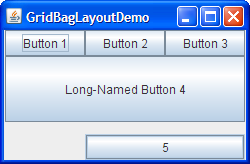
button = new JButton("5");
c.ipady = 0;       //reset to default
// snip ...
c.insets = new Insets(10,0,0,0);  //top padding
c.gridx = 1;       //aligned with button 2
c.gridwidth = 2;   //2 columns wide
c.gridy = 2;       //third row
pane.add(button, c);
Of course there might have been tools to help you generate these layouts but this is essentially the CSS of Java GUIs. If you squint hard enough, you can almost see a stylesheet in there. They call it insets whereas CSS would call it padding.
Qt does a similar thing. This is not me hating on Qt. I breathe a sigh of relief when I can use Qt. It’s quick, it’s light. It looks nice when the scope is small. I don’t want Qt apps to disappear.
The Bet Over Time
So given a goal of distributing a GUI form with project and team constraints, maybe you would select Java and its GridBag. But this technology is not compatible or related to the web version you didn’t write. Over time (with hindsight), this turned out to not be a good bet. Flex, Flash, Shockwave, Applets, Silverlight, ActiveX have come and gone and the pattern is still repeating today. The web tech version we have now has not been perfect and I understand the critics.
I would instead bet that distribution, updates, marketing, docs, interop and many other aspects of this hypothetical Java Applet project would eventually need something that is adjacent to web tech. Maybe the page itself that contains the “active form” or the rich email that you will later send.
Web tech doesn’t auto-win. I still like text. TUIs are great (but perhaps a concession). Native mobile is tricky and no one I talk to really likes generators or abstraction layers they are using (but this is 2nd hand).
Regardless of current abstractions, I feel that complete web tech avoidance is a liability and the implementations can be fixed. I have run into terrible web apis written late or poorly as a feature reluctantly bolted on. Misformed XML, weird JSON, wrong verbs. Whatever a bad API is, it’s usually not coming from a web-native team or culture. These are not specialized projects with an exempt domain. Is that the bet coming due?
If I had to bet I would bet that someone is going to solve Electron’s slowness before Qt displaces web tech or find a performance solution in general. The best thing would be to have a performance workaround or solution while keeping the Web APIs to enable the most interop and reuse. Then I’d rather adopt web tech related skills for the team.
The internal dichotomy I have is considering that I quite like Xcode from what I’ve used and I can’t imagine how you would have both. Trying to use web tech naturally leads to a web view which would have to have an entire engine in it. Now we don’t have web with applet/flash plugins; we have native code with a web plugin. It’s just swapping the framing. If browsers on the desktop can do lightweight native web tech then mobile will too, that’s my hope anyway.
Many Domains, One Tech Stack
The list of things web tech is solving is increasing. There’s very little left untouched. I’m almost speechless. I firmware flashed a teensy board using WebUSB. I changed a configuration on an audio interface using WebMIDI. Someone told me that their browser was opening native files and autosaving to their filesystem and I said “that’s impossible without a security vuln or something” and lo and behold, I was extremely incorrect.
In this vein, here is a list of technologies which were server-side, native or sacredly impossible to have a web alternative and now are in use or soon to be.
| Technology | The Web Tech Version |
|---|---|
| Unix Sockets | Websockets |
| OpenGL | WebGL |
| sqlite or small caches | localStorage |
| MIDI | WebMIDI |
| Assembly | WebAssembly |
| Bluetooth | WebBluetooth |
| Filesystem | Native Filesystem API |
The list continues with similarities like what Web Workers would equivocate to in an operating system context. The list of things web tech is not solving is small regardless of what I think.
When I flashed a development board over WebUSB, there were two options: a binary or use the browser. I used the browser. Zero install and they can control distribution and the environment.
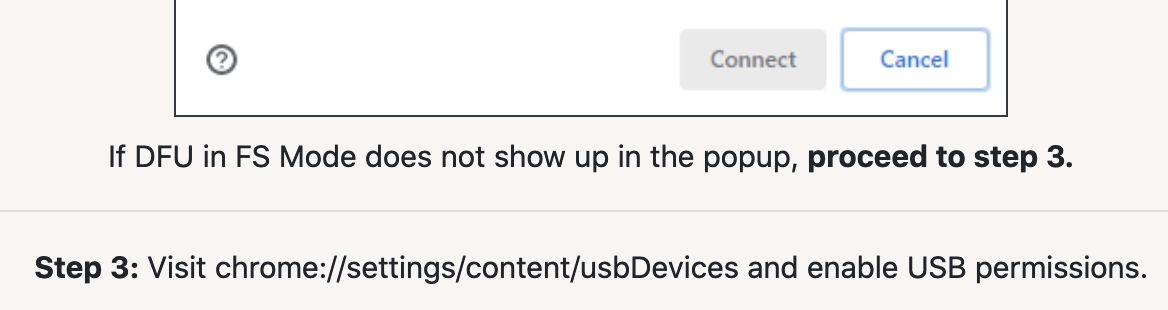
Look at the instructions at the bottom. Visit chrome://.../usbDevices? Amazing.
The Web is the Biggest Target
The web platform is the largest there is. The list of technologies is large. The exclusivity and importance of the operating system is ending and there is a focus and a force by all of us arriving and contributing to a single stack instead of reimplementing bespoke things over and over again. If WebWorkers give you something like threads, why not just use it “for free” with an extremely easy distribution model versus trying to package and maintain Windows/Mac/Linux once again?
It’s not all roses. I have a lot to say about nits and niggles in the web tech space but that will just have to be another post. This topic can extend easily to backend web frameworks with a javascript avoidance bias but I want to keep this focused. Consider these equivalent technologies and the problem with GUI technologies when betting against web tech. Without a major black swan event, I don’t see these technologies (and then naturally skills) going away soon.
The Docker Image Store Is Cache
05 Nov 2021
When you type docker images you get a list of docker images on your system. The image itself is basically a tar file with a content hash. It’s cryptographically guaranteed (like git) to be the content you want because of this hash. You have a local image store because it’s much faster to load content locally than over the internet. So, in this way, docker images are a cache like any other cache.
$ docker images
REPOSITORY    TAG       IMAGE ID       CREATED         SIZE
<none>        <none>    77af4d6b9913   19 hours ago    1.089 GB
postgres      latest    746b819f315e   4 days ago      213.4 MB
Cache Invalidation is Hard
What’s the hardest problem with caching? Expiration! So knowing when to “expire” a docker image must be pretty tricky. Spoiler: it is. First, let’s talk about why we’d want to expire or even manage our docker images to begin with.
Docker has this image store but in the beginning they didn’t have a clear procedure for what you were supposed to do when you accumulate more and more images. You either fill your physical disk on Linux or fill a virtual disk on Mac/Windows and then docker stops working. There are countless threads about the qcow file but there was never any guidance as to what people were supposed to do to manage the images.
Spotify created a helper script called docker-gc to help manage this problem. It’s been archived in favor of docker system prune but this is not a complete solution. Removing images is like expiring the cache, the tricky part is knowing when to do so.
When you are building images, docker will print out intermediate steps as SHAs that you can enter and debug. When you tag a SHA hash, you are tagging a <none>. If you docker system prune then you could throw away data you care about and image prune is not much better. More so, you are blowing away your cache so builds will take longer. Spotify’s docker-gc let you specify images you want to keep which is useful for the previous examples when you are making images.
Sometimes, people suggest cron’ing the prune so the disk never fills up. If I cron docker system prune I’ll lose data (or at least cache hits) every day and might not know why. And it’s still not solving expiring the cache. Eventually your disk could fill up with tagged images and system prune will not have saved you. Your image store is a cache and you can’t tell if it’s out of date or full of unused things. What’s worse is, given no running containers these prune commands will basically empty your image store. So what’s the point of the image store?
You could devise a way to filter docker images using Go templates but this is far too advanced for the use case Docker is aiming for.
My Suggestions
I don’t have a list of quick fixes for the difficult problem of cache invalidation. However, in a perfect world:
- Docker would run on all OS’s natively so the disk usage would be more obvious.
- Keep using docker-gc and ignore their advice.
- Write an updater that works like
aptwhere it tells you that your images are old. This isn’t easy but this is event-driven and not time-driven. Event-driven caches are more precise. - Write an alternate utility that works like docker-gc using Go templates to tag and manage images.
- Docker would provide tooling or some advice as to what to do when people use their product enough to fill their disk.
- Run a local caching server to mitigate internet pulls? You’re still building all the time and losing partial images if you are cron’ing or running prune.
- Do the typical cache shrug thing of using time as when to expire.
docker system prune -af --filter "until=$((30*24))h"You’ll lose cache hits and lose data, just delayed. At least you’ll eventually get new images oflatestI guess.
I hope this post explains a bit of what’s really going on and why this is so tricky. The docker image store is a cache.
Toxic Places with No Inputs
29 Oct 2021
I went to a talk by Susan Bonds who worked on projects like I Love Bees, a Christopher Nolan project and a Trent Reznor augmented reality project. I was fortunate enough to be the only one who knew who Trent Reznor was at the talk so when we went to lunch I got to sit across from her at the lunch table and everyone just listened to us talk. It was a strange experience. This was a long time ago but I want to talk about a very particular thing which has stayed with me.
Susan was hired to inject some life into the Nine Inch Nails (NIN) forum. NIN hadn’t really been making as much music as before and my take was that people were scared that their favorite band (one of my favs too) weren’t making music anymore and the glory days had passed. Hang onto this idea.

So she developed a series of augmented reality games and events that reinvigorated the fanbase. It was an extremely interesting series of hidden mp3 sticks and hidden puzzles, ending in a staged concert that was broken up by fake police and tear gas. The fans loved it. They created wikis and collected information. There were fake shutdowns and images “sent from the future”. It was an ARG.
You can see in the picture above a spectrogram of the found-in-a-bathroom mp3 file with a hidden image that was itself a pretend “leaked from the future” image of an alien. The fervor and excitement must have been crazy. But think about what I said about “Hang onto this idea”. This entire ARG campaign was started to inject new energy into a forum who were eating themselves alive. It didn’t go unnoticed.
I think about Slashdot, Perl forums, Usenet and yes even boards I associate myself with like Ruby. When Ruby came out it was in direct competition with Perl. Perl gained fear of Ruby. When Node came out, Ruby gained fear of Node. When Go came out, Node perhaps gained fear of Go. And so on to Rust and to Zig and to whatever else is next. Each generation causes fear from the old. But here I’m specifically talking about the lack of input and what the forums are like. Without input, things stew and ferment.
Elixir breathed new life into the Erlang community and Joe Armstrong was happy for it. To me, this is the most mature way to look at it. I can’t imagine average forums of fear having this kind of positive attitude with strangers over anonymous text.
Things That Draw Themselves
15 Oct 2021

In game development, you will probably have a player object that you need to draw to the screen. Whenever I was making generative art or a small game, having a thing drawing itself was really great. In React or other JS frameworks, the same concept exists but we don’t think of it this way. Moving to functional components is hiding the render function a bit but this is what’s happening. There’s an object/function that knows how to draw itself.
function Welcome(props) {
  return <h1>Hello, {props.name}</h1>
}
When I’m making CLIs, I try to do the same thing. Instead of putting a mix of logic and presentation in a switch/case statement, I can make a sort of command object that knows how to draw itself.
An Example Without Drawing
Let’s make a really, really contrived todo list app. Typically we’d probably use a cli library or something. This might make separating the options from the logic slightly different but you can follow the same pattern here.
def main
  todos = [
    { name: "Make lunch" },
    { name: "Whistle math metal" }
  ]

  if ARGV[0] == "print"
    puts todos
  end
end

main

# ruby drawless.rb print
# {:name=>"Make lunch"}
# {:name=>"Whistle math metal"}
Nothing exciting here. I think a lot of people make CLIs like this. But then it grows and they are left with procedural messes. Instead we can make a thing that draws itself.
Drawing Example
class TodoList
  def initialize(items)
    @items = items
  end

  def draw
    @items
  end

  def print
    puts draw
  end
end


def main
  todos = [
    { name: "Make lunch" },
    { name: "Whistle math metal" }
  ]

  if ARGV[0] == "print"
    list = TodoList.new(todos)
    list.print
  end
end

main
We have to run this manually:
$ ruby cli_drawing.rb print
{:name=>"Make lunch"}
{:name=>"Whistle math metal"}
Your first reaction might be “that’s the same thing with more steps”. It’s true. It is the same thing. The invocation stayed the same and really the internal data stayed the same. The big difference here is organization and testability. The print method only does puts and the draw method knows what to present to print. So, when you write a test, it’s super easy. You just test draw and you have extreme confidence that puts is going to work. You don’t need to test puts because you don’t own that code.
Let’s write a test inline here just to show how this works. You’ll have to invoke the program with rspec cli_drawing.rb instead of running it like a script. This is just to avoid making a whole project.
class TodoList
  def initialize(items)
    @items = items
  end

  def draw
    @items
  end

  def print
    puts draw
  end
end

describe TodoList do
  subject { described_class.new(todos) }

  let(:todos) { [
    { name: "Make lunch" },
    { name: "Whistle math metal" }
  ]}

  it "prints a todo list" do
    expected = [{:name=>"Make lunch"}, {:name=>"Whistle math metal"}]
    expect(subject.draw).to eq(expected)
  end

end
And then you can test or create your CLI runner in isolation. The CLI runner’s job isn’t to print or render but to call commands. This is easy to test and write. What you are really doing is moving IO to the edges. It’s confusing to have draw and print methods, you can name them whatever you want; maybe run and render would be more clear. The point here is about making a method with the data representation and then having the IO (puts) in a method by itself so we don’t have to deal with STDOUT. Pushing I/O to the edges is really the point of my post don’t test code you don’t own.
Things that draw themselves end up being very clean objects. If you are in a functional language, you will still have modules. Modules can be organized in the same way. When you think about things drawing themselves, you are making clear lines of responsibility which will help you.
Security is Infinite in Time and Scope
24 Sep 2021

I think any topic can be turned into one about security.
Security is Infinite in Time
You can’t buy, have or achieve security. Any security you think you have is coupled to time. Your feeling or belief of being secure can change to insecure at any momenet. So security is more like fitness. You practice fitness. You might be fit now but you cannot be done with fitness.

You have to keep exercising your whole life and this isn’t a completely depressing thought, it’s the glass half empty version. You get to exercise to keep yourself from feeling like crap your whole life. yea i know that tweet is a joke
So security is infinite in time so it has the chance to always be a topic, forever.
Security is Infinite in Scope
I’m going to blindly pull three topics from lobsters and spin them into security.
- deskto.ps — share annotated screenshots of your desktop - That’s easy. What if you share a screenshot of a password? Also, someone mentions anonymous sharing (security as authn) in the comments.
- std::optional and non-POD C++ types c++ blog.felipe.rs - C++ can have memory leaks, why not RIIR.
- macOS Finder RCE mac security ssd-disclosure.com - Is already about security, that’s no fun. :(
It’s not a weird flex. I think anyone can spin any topic into a security-based one. So we need to be diligent, have transparency, find out the details and not just accept all security arguments.
Security is infinite in scope so you can turn any topic into one about security. Combine these two together and you have my point.
Information Is Late Game
17 Sep 2021
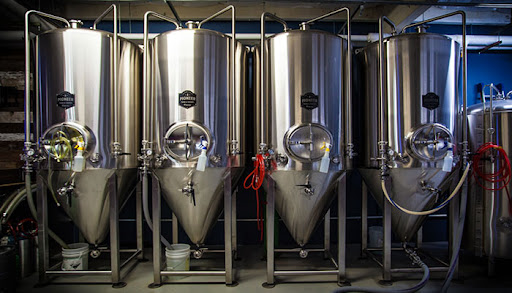
Many years ago I was at a meetup at a brewery and I noticed a bunch of IoT devices on the brewery equipment. I have no idea how the machines work or what they are measuring but I started thinking about this Information Is Late Game idea.
Someone at that brewery had to get the beer working. After they got the beer working, they sold the beer. As they are selling the beer, they are wondering “are we selling enough beer?” and “how is our beer doing?”. First came the thing and then came the information describing the thing. Information is late game.
The IoT sensors can measure temperature and liquid flows. The payment system can record revenue. The schedule can be a calendar. The people working can be in a database. All the stuff that happens after the real thing is information. The information is what doing all this stuff means. The review score, the money. Even if it’s not digital, it’s information. We were doing this almost immediately after inventing farming.
Physicists and mathematicians might say that all this is entirely information but that’s entirely too interesting for me to talk about.
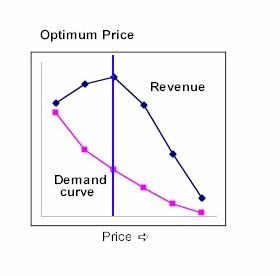
Here another one using the same brewery. What should the beer’s price be? Not what the intial price should be. We’re already selling beer. I mean, what should we change the price to? The adjustment and the measuring of price’s impact on sales isn’t even digital. It’s just information. Information about the “real” business. You really need and want this stuff late-game the most. Optimization and measurement when there’s too much on the line and organization when there’s too much information. Automation when there’s too much to do, automation with rules and inputs that are information.
Electronics follow this same pattern. You have sensors and code. Sensors measure the real world. Your code works on the information of the world. Once I hook up the motors, sensors and displays; it’s mostly set physically. I’m working in information from there on out in development and especially when it’s running.
I understand this is annoyingly generalized. Just one more.
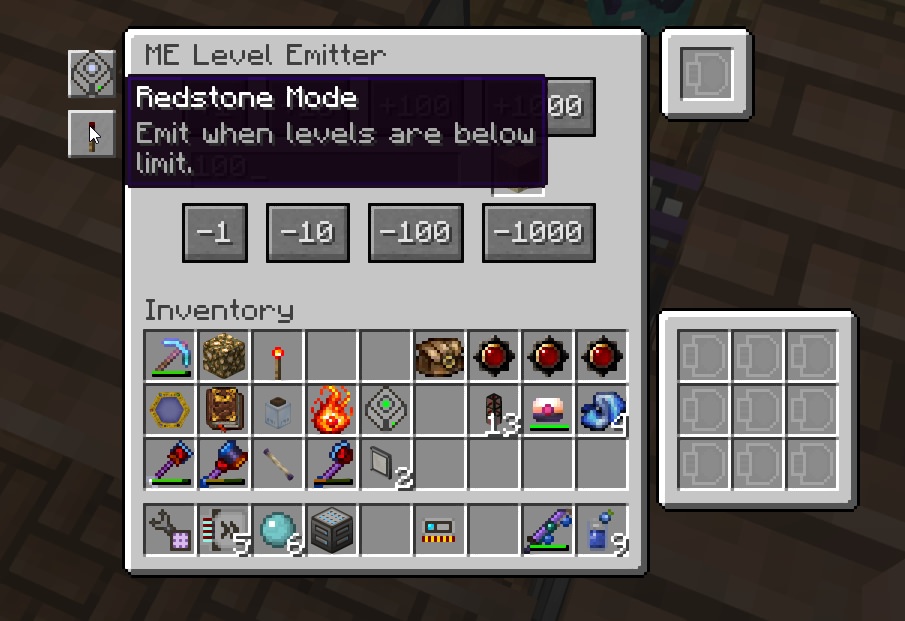
Here’s another one at the risk of exposing an enthusiast trench. A friend and I are playing Minecraft. We make a hut, we get established. We start smelting things. We have a couple of iron bars. How many do we have? We want to know or we want to act on this. It’s a number! It’s a number in a chest. What is it? How much do we have? We did the “physical” work to get them, what does it mean to us?
Time progresses. Eventually we feel the need to have a digital inventory system to maintain stock levels or do reporting on how much stuff we have. Is this fake digital game any different than what we would do?
We had the same thing happen in Factorio. Money and finance is kind of an easy one but I think information systems and how those things work is probably more nuanced and interesting. I just think it’s late game, it’s not a unique perspective. The information age itself came later on, after the “real” thing. But we wanted to know what it all meant, or how to organize it.
Sciencing Out Updates
10 Sep 2021
During a project’s life, the minimum amount of change you will encounter is from security updates sources. There are many sources of change. If you are going to switch versions, bump a package, try a new framework version or port to a new language version that is a big lift; the least you could do for yourself is make it less stressful. I’m going to describe a nice workflow for the simpler versions of this situation.
I’m using python as an example just to highlight some tooling but this is not python specific although I hope this is a new take or maybe cross-pollinated from other tech circles than python.
Try Updates In A Branch
There’s a workflow around updates that I wish I could write on the moon. Given ~90% code coverage and lots of confidence in the test suite, here’s how I would update a project in a major way (say moving from like python2 to python3 or updating Django by a major version).
git checkout -b python3_update
asdf local python 3.9.6 # asdf is an "every language" version manager
poetry run task test # invoke pytest
# note errors
# let's say requests throws an error
poetry update requests
poetry run task test # invoke pytest again
# keep iterating, you have a list of stacktraces at this point
# work the list

# on test suite pass, commit the change for python
# remove .tool-versions if `asdf local` created one
# edit pyproject.toml (upcoming PEP that poetry already uses) to require 3.9.6
# commit everything (this should be package changes in your deps and lock file and the pyproject python version)
Now the effect of this is:
- You can open an MR with all the code and all the change that represents moving from python2 -> python3
- The person reviewing can replicate by doing
poetry installand will receive an error message saying “you need 3.9.6” etc - The reviewer has a better time, new hires / project members have a better time
- The best part of this is … it’s a branch for a major change. Minimal worry and then less stress. It’s an experiment and a commit. CI reuses it.
- This same workflow can work to update django or flask or something huge and you have a list to work on
This is a great workflow to me. It’s very familiar to me from other languages. I’m not saying the upgrade is automatic, I’m saying this is more like an experiment where you measure and find out how hard the upgrade is going to be. Not doing at least this flow makes me think of hoping and praying and I think it’s enabled by tooling so that’s the next topic.
What We Are Really Doing
- Specifying dependencies we want to try
- Setting up an environment to measure things in
- Exercising as much of our code as we can
- Asserting things
When we measure our code for defects in the environment that includes updated packages or language runtime, we try to find out as much as we can.
The Tools in Play
Dependencies
Our project’s dependencies are managed by a human-editable project file and a machine usable lock file.
The dependency file is pyproject.toml and the lock file is poetry.lock. There are other tools but they follow this pattern.
- You edit the dependency file with what you want
- You run an explicit update and the dependency tree is resolved (hopefully, this is not guaranteed)
- Your lock file is written with the solution
- Your update is complete and repeatable
Language Runtime
Dynamic languages need a runtime or really a development environment (unfortunately). Poetry has a section for this:
[tool.poetry.dependencies]
python = "^3.9.6"
Using requirements.txt won’t get you this. There’s also sort of a different take on this with .tool-versions and asdf which will switch versions for you automatically. You can drop a file in your project declaring what you want. Your shell or language manager might pick up on this file so you aren’t activating and deactivating.
The downsize of not setting your runtime or your packages in a more permanent way is that all commands you would run are prefixed with poetry run.
Some people find this really annoying. They might find this so annoying that they bail on the entire idea. I have a few workarounds:
- Make an alias. In fish, when I type
prit autoexpands topoetry run. - Use long running commands like test watches or http servers.
- Get used to it? 😐 Many other languages have prefixes:
yarn run fooandcargo fooandbundle exec fooand others - If you have an app, make a bin dir full of helper scripts. You probably want these anyway instead of README blocks.
- If you embrace prefixes, you can use taskipy and get
poetry run task foo, stay in python and avoid Makefiles.
Git Branches
By using all these files that are inside the project, nothing exists outside the project except for the install directory. Thusly, you can commit everything and your major change is able to be viewed as any old change.
Larger Upgrades
On a huge project, this simple approach doesn’t work. A large lift is a long running branch, those are no good. It’s going to be horrible to maintain parallel branches and deal with merge conflicts. Scaling this out is kind of beyond what I wanted to talk about but you can read about Github’s major upgrade which will show you some similar tricks. In their case, the workflow is very similar (but different). They ended up with a 2,000 item todo list off a branch and iterated. It’s a good listen about scaling this idea out.
Conclusion
This post is focused on python but it’s not about python. I’ve taken this workflow to many languages and if the tooling is in place, the flow stays familiar.
- Checkout a branch to play in
- Make changes
- Measure change with tests
- Commit changes for review
This is just the basics to me, failure is still possible. You’d want smoke tests and other tooling. I just wanted to describe how language tooling is an enabler.
A REPL Based Debugging Workflow
03 Sep 2021
Let’s say we have this code that isn’t working.
// some code we inherited, we don't get it, now what?
function findUsers(users, age) {
  var hits = new Array([]);

  for(var i=0; i<(users.length); i++){
    if (users[i].age < age) {
      hits.push(users[i]);
    }
  }

  return hits;
}
It’s causing some issues somewhere else and we have no idea what root cause is. In the real world, ending up at a tiny piece of code where we think the problem lies is very lucky. This is probably the result of lots of tracing and investigative work. But let’s just pretend that we ended up here.
We’re going to walk through our approach and challenge ourselves to think about why and how we are thinking. We ourselves are not going to turn into computer compilers or syntax interpreters. But before that, we’ll study the anti-patterns first.
When you are trying to figure out something that is broken or even develop something to make something new:

Anti Pattern 1 - The Human Interpreter
If I ran into this bit of code, the first thing I’d not do is grab my chin and stare at each line, trying to catch the bug. I don’t want to do this because the bug is usually not as obvious as this example (it might not be obvious to you, that’s ok). So, staring at the code is healthy and normal but this is not the core of our process. What we’re going to do is get a feel for the code by exercising and playing with it.
Anti Pattern 2 - Print Statements
You might be tempted to start dropping console.log() statements all over the place. I do this too but I try to get away from this as fast as I can. Print statements are throwaway code and mostly a waste of time (in general). You can get something that works much better as a one-liner (breakpoint) or a mouse click (breakpoint).
Anti Pattern 3 - Opening a Shell
Node / Python / Ruby and other languages have an interactive shell called a REPL. You could copy and paste the above function and mess around it in a REPL. This is great for learning and is completely on the right track.
The problem is, what is users and age? Age is probably a number. But even if we know what users is, we have to type it in. And, if we want to experiment on the function itself, we have to type that in too to redefine it. In some REPLs this can be very annoying because of whitespace and syntax.
A Debugging Workflow
First, you need tests. If your project doesn’t have tests, this won’t work as well. You’ll have to pay the cost to make that happen or step back a bit. I’ll have a section about finding a workaround.
Every test follows a pattern:
- Setup
- Execute
- Assert or Test
What we do is create some dummy data to expose the bug for the Setup.
// setup
let john = { name: "John", age: 25 };
let pete = { name: "Pete", age: 30 };
let mary = { name: "Mary", age: 28 };

let users = [ pete, john, mary ];
And then we call the function as execute:
// execute
var result = findUsers(users, 29)
And then we can tell the computer to fail if it is not what we expect. First, let’s define what we expect. This function seems to want to find users under a certain age. So the answer should be John and Mary:
var expected = [ { name: 'John', age: 25 }, { name: 'Mary', age: 28 } ]
And then we assert in whatever testing library we are using. This test is going to fail at this point (that’s the bug). So, now we have a failing test. But more importantly, we don’t have to keep typing our function or our data over and over again in a REPL to play around with it.
But wait! We haven’t outperformed simple print statements yet!
First, let’s get our test created with some module and importing boilerplate.
var findUsers = require('./repl_debugging.js');

describe("finding users", () => {

  it("finds users under a certain age", () => {
    // setup
    let john = { name: "John", age: 25 };
    let pete = { name: "Pete", age: 30 };
    let mary = { name: "Mary", age: 28 };

    let users = [ pete, john, mary ];

    // execute
    var result = findUsers(users, 29);
    var expected = [ { name: 'John', age: 25 }, { name: 'Mary', age: 28 } ];

    // assert or test, jest uses expect
    expect(result).toStrictEqual(expected);
  })

})
The main file looks like this:
// something we inherited, we don't get it
var findUsers = function findUsers(users, age) {
  var hits = new Array([]);

  for(var i=0; i<(users.length); i++){
    if (users[i].age < age) {
      hits.push(users[i]);
    }
  }

  return hits;
}

module.exports = findUsers;
We’re going to put a debugger; print statement in to break in our code.
Now unfortunately, some languages are easier to debug than others. You might be using javascript for a web frontend in which case you’re going to need to figure out chrome or firefox developer tools or wire up a VSCode or other editor/IDE config to enable breakpoints and interactive debugging.
For now, I’m going to show you NDB and this flow.

Run this command to watch tests and run our debugger
ndb $(npm bin)/jest --watchAll --runInBand
First, our breakpoint breaks in this function and when we hover over variables we can see their values without console.log().
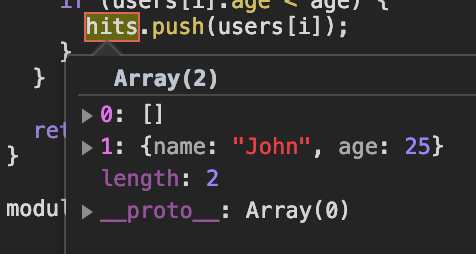
Now we see that the element at 0 is wrong. We need to fix that.
We change the line to be
// something we inherited, we don't get it
var findUsers = function findUsers(users, age) {
  var hits = new Array();
And the test passes. Now you could refactor that for loop into a map or something. :)
I Don’t Have Tests!
Create a file that executes the function with setup data. You’re basically making a test suite yourself. This is close enough to the nice REPL + test workflow that you might be able to make it worth it. In this case at least you don’t have to type the test data over and over again. When I find myself doing this, I copy it into a test. Once I have it in a test, I can drop REPL breakpoints in.
The Big Lesson
- Put your setup and dummy data into a file
- This file can be a test.js file in a
testsfolder - If you do this, your debugging becomes a test
- You can put breakpoints in code or in a test
- If you put breakpoints in the test, you can break and inspect outside of the code
- If you put breakpoints in the code, you get all your test data and setup in the REPL session, no typing over and over again
- You can add/remove breakpoints and have your test suite run all the time
Doing these things creates a steady feedback loop. In addition, if you develop an algorith in the REPL shell, just copy it into the code. If you find some useful test data in the REPL shell, copy it into the test.
Playing around in a REPL from inside in a test run is a great way to develop algorithms, methods, test data and expectations that your probably need to save in a file anyway
The anti-patterns aren’t “evil” or “wrong”. I just prefer the REPL + test flow for all the previous reasons listed and it sets us up for other things like refactoring and stability.
Commodities, Economic Scaling and Compute
27 Aug 2021

I wanted to chat about economic engines, side effects and network effect type sources of change. These topics are very broad and so please bear with me. I hope you see an interesting pattern and don’t get too caught up in the specifics.
A Bookstore Makes The Cloud
This is probably the most recognizable one so I’m starting with this first.
AWS had a successful online bookstore. They eventually enhanced their site to include other types of products but the the initial push was books. As they scaled their site (fueled by success) they had extra compute capacity but also a shared platform for internal and external sites. Eventually they decided to open up the platform to everyone and sell the service. What was useful for them internally and a limited number of customers could be useful for everyone.
Eventually the scaling was so successful that it became a named compute paradigm. In certain workloads and architectures using AWS is so cheap and effective that it’s a bit of a defacto choice. The word Cloud before AWS would likely get you a rare network symbol search engine hit but now it generally means something else. Cloud Computing is advertised during NFL games and should be credited to AWS and its bookstore engine.
A bookstore creates a new compute paradigm
Video Games Created HPC GPUs
Video games are compute intensive simulations. Video game players demand high performance. Nvidia and other companies invented GPUs to bring that performance for these simulations. GPUs would increase in power every year, funded by gamers who want high performance and companies who wanted their games to pop and astonish. Eventually Nvidia would create a slightly more general purpose language called CUDA which could run specialized code on these GPU cards. Originally, CUDA was intended to run small programs called shaders to do specialized effects or work in a game.
Eventually, someone realized that you could use this general-ish language CUDA to do meaningful work on wide datasets. The width of the datasets were a close match for the wide nature of video game pixels. Doing this same work on CPUs would be too slow. This is already what video games had experienced for graphics and given birth to GPUs in the first place.
Eventually Nvidia would create a new business division around selling GPUs to companies doing High Performance Computing (HPC) and Machine Learning (ML). Many new and interesting innovations would come out of this progression. HPC was a concept before and there were many other products and companies involved but following just the Nvidia story illustrates the point.
Gamers funded modern HPC and compute
Mobile Phones and Processor Manufacturing
This one is really interesting to me. There are two parts to this. One, manufacturing. The other, architecture.
First, CPUs have a long history but let’s focus on recent events. ARM recently has been challenging x86 on a performance front but instead I want to focus on process nodes. You can’t really compare process nodes between manufacturers but let’s try anyway. Why is Apple on 5nm and Intel (king of kings for so long) on 14-10nm manufacturing process?
Making chips is hard. Apple doesn’t make their own chips. Who are they using and who are they? Today, TSMC is making Apple’s M1 chips on their 5nm node which has been fueled by mobile phones. TSMC has gained so much experience from making mobile phones that they are really good at it. Samsung makes phones, it’s the same and Samsung is also driving transitor density at scale.
Even if Apple wanted to work with Intel, they wouldn’t do it. TSMC is doing leading edge work and buying the majority of ASML’s EUV machines.
Mobile phones change transistor manufacturing
Processor Speeds Increase Network Bandwidth
This is really outside my lane but I talked to a low level network engineer about this (and so my understanding is simplified). He said that compute speed is speeding up network speed. As an example, two switches with a fiber cable connected between them will emit and multiplex light at a certain rate. This rate is CPU bound. As processor (or CPU speeds) increase, so does bandwidth. We weren’t talking about your ISP or specific products. What I mean is, why have progressed at all from 10mb to 100mb to gigabit and beyond over the same physical medium (copper)?
Or put another way, have we hit the theorical limit of fiber? Do we know what the practical limit is?
The answer to both of these is no. We’re doing more and more tricks with light divisions, noise and other things but the fiber itself is unchanged. We’ll find out the limits when the system is no longer CPU bound. It doesn’t really have a lot to do with fiber. Copper hasn’t changed either.
So whatever processor side effects I’ve mentioned above would also affect this thing here.
If Apple came out with an ARM chip that is one million times as fast as any specialized processor, ASIC or other chip; you’d use it for network switching and set a network world record (assuming the same amount of noise).
Processor speed improvements increase global network bandwidth
Commodity Processors
A long time ago, x86 was pretty bad compared to IBM (power) and Sun (sparc) chips. “Real” servers would run on these custom chips. But then commodities kicked in. Not just on the CPUs themselves, but even the motherboards. There were Dell server motherboards so cheap and derived that you could saturate the PCI bus by filling in all the I/O cards. This wasn’t the case with Sun boards but the Sun boards were much more expensive. This would be the equivalent of today of having a server chip without enough PCI-E lanes.
Eventually Intel chips would be faster and cheaper than the IBM/Sun chips. Even if the technology was better (or different) in many ways, it didn’t matter. In this way, commodities were one piece of it but the other was performance. Intel got all this economic fuel from desktops, gamers and cheap servers. The mass market was fueling the engine. Now the same is happening from mobile but it’s architecture. There’s the very real possibilities that we are at an inflection point and chip manufacturers are going to have to catch up. But Apple has 2 trillion dollars (mostly from mobile).
The same thing happened with the PS3 to PS4 transition. PowerPC was based on IBM’s power architecture. This was dropped for x86. In the future I wouldn’t be surprised if consoles were ARM or something that reflects economies of scale.
How did this happen? Why couldn’t x86 keep up? I think it’s mobile phones. Just look at Apple’s revenue and where it’s coming from.
Commoditity x86 replaced POWER and SPARC server chips
In the future, maybe commoditiy and server x86 chips are replaced by ARM which was fueled by mobile phones. When this happens, there will be another reductive quote here. :)
Wrap Up
I hope these reductive cause and effect topics aren’t too polarizing. I just wanted to highlight some second-order effect engines of S-curves and a few examples in one place.